

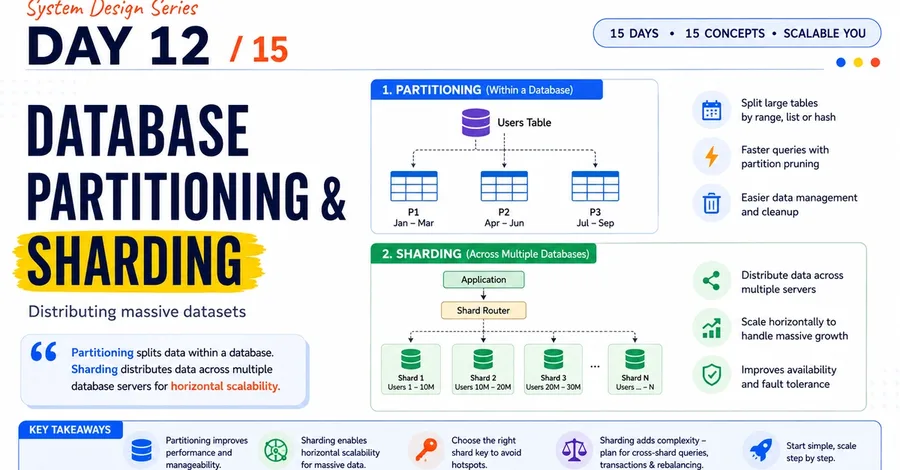

As an application grows, its database grows with it. A small application might start with a few thousand users and a single database server. But what happens when that application reaches millions of users, processes thousands of requests per second, and stores terabytes or even petabytes of data? At that point, simply buying a more powerful database server is not always enough. This is where database partitioning and sharding come in. In this article, we'll understand what they are, why they matter, how they work, and when you should use them. The Problem: One Database Can Only Scale So Far Imagine a social media application with: 100 million users Billions of posts Millions of requests per second Terabytes of new data every day Initially, you might have a single database: Application │ ▼ ┌─────────────┐ │ Database │ │ Server │ └─────────────┘ As traffic grows, this server can become a bottleneck. You may face: Slow queries High CPU usage Memory limitations Storage limitations Increased latency Database outages affecting the entire application The obvious solution might seem simple: Buy a bigger server. This approach is called vertical scaling . Small Server ↓ Bigger Server ↓ Even Bigger Server But vertical scaling has limits. You cannot infinitely keep upgrading a single machine. Eventually, you need to distribute the data across multiple machines. This is where partitioning and sharding become important. What Is Database Partitioning? Database partitioning means splitting a large dataset into smaller pieces called partitions . Instead of storing everything as one huge table, the data is divided based on a specific rule. For example, imagine a users table: users
id | name | country
1 | John | USA 2 | Ravi | India 3 | Emma | UK 4 | Amit | India ... You could divide this table into smaller partitions. For example: Users Table │ ├── Partition 1 ├── Partition 2 ├── Partition 3 └── Partition 4 Each partition contains only a portion of the total data. Types of Database Partitioning There are several common ways to partition data. 1. Range Partitioning In range partitioning, data is divided based on a range of values. For example: User IDs
1 – 1,000,000 → Partition 1 1,000,001 – 2,000,000 → Partition 2 2,000,001 – 3,000,000 → Partition 3 Another common example is date-based partitioning. Orders
January 2026 → Partition 1 February 2026 → Partition 2 March 2026 → Partition 3 This works especially well for time-series data. For example: Logs Transactions Orders Analytics events Example SELECT * FROM orders WHERE created_at >= '2026-08-01' AND created_at < '2026-09-01' ; The database may only need to search the August partition instead of scanning the entire orders table. This is known as partition pruning . 2. Hash Partitioning In hash partitioning, a hash function decides where the data goes. For example: hash(user_id) % 4 This could distribute users like this: User 101 → Partition 1 User 202 → Partition 3 User 303 → Partition 2 User 404 → Partition 4 Architecture: Users │ ▼ Hash Function │ ┌─────────┼─────────┐ ▼ ▼ ▼ Partition 1 Partition 2 Partition 3 The main advantage is that data can be distributed more evenly. This helps prevent one partition from becoming significantly larger than others. 3. List Partitioning In list partitioning, data is divided based on specific values. For example: India → Partition 1 USA → Partition 2 UK → Partition 3 Other → Partition 4 This can be useful when data naturally belongs to different categories or regions. What Is Database Sharding? Sharding is a form of horizontal partitioning where data is distributed across multiple independent database servers. Instead of: One Large Database You have: Application │ ┌────────────┼────────────┐ ▼ ▼ ▼ Database Database Database Shard 1 Shard 2 Shard 3 Each shard stores only part of the total dataset. For example: Users 1 – 10M → Shard 1 Users 10M – 20M → Shard 2 Users 20M – 30M → Shard 3 Now, instead of one database handling everything, the workload is distributed. Partitioning vs Sharding The terms are sometimes used interchangeably, but there is an important difference. Feature Partitioning Sharding Data split Yes Yes Multiple servers Not always Usually Database manages split Often Often handled by application/infrastructure Main goal Improve performance and manageability Scale horizontally Complexity Lower Higher A simple way to remember it: Partitioning splits data. Sharding distributes those splits across multiple database servers. How Does Sharding Work? A sharded system needs a shard key . A shard key determines where a piece of data should be stored. For example: shard = user_id % 4 Then: User ID 101 → Shard 1 User ID 102 → Shard 2 User ID 103 → Shard 3 User ID 104 → Shard 4 Architecture: Application │ ▼ Shard Router │ ┌───────────────┼───────────────┐ ▼ ▼ ▼ Shard 1 Shard 2 Shard 3 Users A-F Users G-M Users N-Z When a request arrives, the system determines which shard contains the required data. Choosing a Good Shard Key Choosing the right shard key is one of the most important decisions in a sharded architecture. A good shard key should: Distribute data evenly Distribute traffic evenly Be frequently available in queries Avoid creating hotspots Support future growth For example, using user_id is often a good choice because many operations are user-specific. Get user profile Get user posts Get user settings Get user notifications All of these requests can potentially be routed using the user's ID. The Hot Shard Problem Imagine a social media application where users are sharded by celebrity accounts. A few celebrity accounts may generate millions of requests. Shard 1 → 100K requests/sec Shard 2 → 5K requests/sec Shard 3 → 6K requests/sec Shard 1 becomes overloaded while the other servers remain mostly idle. This is called a hot shard or hotspot . A poor shard key can cause: Uneven storage Uneven traffic Slow requests Server overload This is why shard key selection is critical. Example: Sharding a Social Media Application Imagine we have 100 million users. Instead of storing everyone in one database: Users DB 100 Million Users We divide them into four shards. User Service │ ┌───────────┼───────────┐ ▼ ▼ ▼ Shard 1 Shard 2 Shard 3 25M Users 25M Users 25M Users │ Shard 4 25M Users A routing layer decides where each user belongs. For example: user_id = 12345
12345 % 4 = 1
→ Send request to Shard 1 The application can now handle more data by adding more shards. Challenges of Database Sharding Sharding solves scaling problems, but it also introduces complexity. 1. Cross-Shard Queries Imagine you want to run: SELECT * FROM users ORDER BY created_at DESC ; If users are distributed across multiple shards, the system may need to query every shard. Shard 1 ─┐ Shard 2 ─┼──→ Combine Results Shard 3 ─┤ Shard 4 ─┘ This can be expensive and slow. 2. Joins Become Difficult Suppose: Users → Shard 1 Orders → Shard 2 A query like: SELECT * FROM users JOIN orders ON users . id = orders . user_id ; becomes much harder when the data exists on different servers. Distributed joins are usually more expensive than joins within a single database. 3. Rebalancing Data Suppose you initially have: 4 Shards Later, your application grows and you need: 8 Shards Now, some data may need to move. Shard 1 → Split Shard 2 → Split Shard 3 → Split Shard 4 → Split Moving large amounts of data can be complex and risky. This process is called resharding or rebalancing . 4. Distributed Transactions Transactions are simple when all data exists in one database. For example: Transfer Money
Account A ↓ Account B But if Account A and Account B are stored on different shards, maintaining consistency becomes more complicated. You may need distributed transaction strategies such as: Two-phase commit Saga pattern Event-driven workflows When Should You Use Partitioning? Partitioning is useful when: A table has grown very large Queries frequently target specific ranges You have time-based data You want faster query performance You need easier data cleanup For example, log data can be partitioned by month: Logs_2026_January Logs_2026_February Logs_2026_March When old data is no longer needed, you can remove an entire partition instead of deleting millions of individual rows. When Should You Use Sharding? Sharding is useful when: A single database server cannot handle the load Storage requirements exceed one machine Write traffic is extremely high You need horizontal scalability Your application has millions of active users However, sharding should not be the first solution. Before sharding, consider: Better indexing Query optimization Caching Read replicas Database partitioning Vertical scaling Sharding adds significant operational complexity. A Realistic Scaling Journey Most applications don't start with sharding. A typical evolution looks like this: Stage 1: Single Database Application │ ▼ Database Stage 2: Add Indexes and Optimize Queries Application │ ▼ Optimized Database Stage 3: Add Caching Application │ ├── Cache │ ▼ Database Stage 4: Add Read Replicas Application │ ┌──────────┼──────────┐ ▼ ▼ ▼ Primary Replica Replica Database Database Database Stage 5: Partition Large Tables Database │ ├── Partition 1 ├── Partition 2 └── Partition 3 Stage 6: Shard the Database Application │ Shard Router │ ┌─────────────┼─────────────┐ ▼ ▼ ▼ Shard 1 Shard 2 Shard 3 The key lesson is: Don't introduce sharding before you actually need it. Final Thoughts Database partitioning and sharding are powerful techniques for scaling systems that handle massive amounts of data. Partitioning helps organize and optimize large datasets by splitting them into smaller logical pieces. Sharding takes this further by distributing data across multiple database servers, allowing an application to scale horizontally. But with great scalability comes greater complexity. You need to carefully think about: Partition strategy Shard key selection Data distribution Hot shards Cross-shard queries Rebalancing Distributed transactions The best approach is to start simple. Optimize your queries, use indexes, add caching and replicas, partition when necessary—and move to sharding only when a single database can no longer handle your application's scale. Because in system design, the goal isn't to use the most complex architecture. The goal is to use the simplest architecture that can handle your scale. Key Takeaways Partitioning splits large datasets into smaller pieces. Sharding distributes data across multiple database servers. Common partitioning strategies include range, hash, and list partitioning . Choosing the right shard key is critical. Poor distribution can create hot shards . Sharding improves scalability but increases system complexity. Optimize your database before deciding to shard. Start simple and scale your architecture when the actual requirements demand it.