

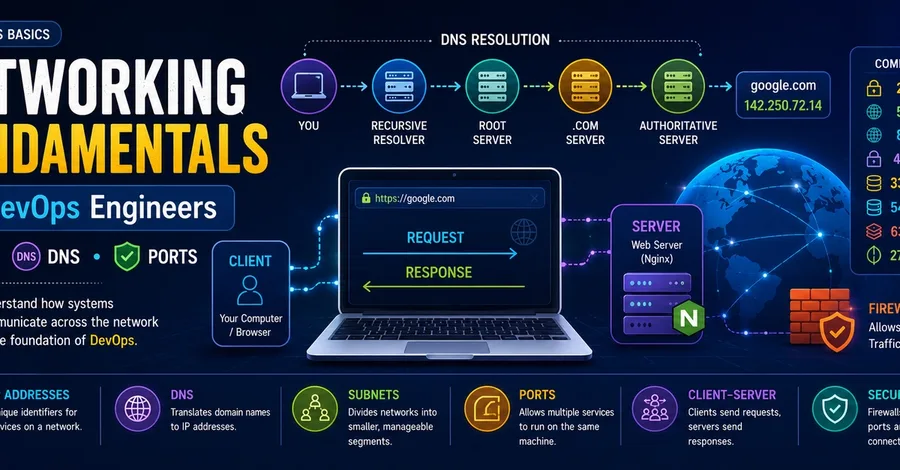

If you're learning DevOps, networking is not optional. Every SSH connection, web request, Docker container, Kubernetes service, and cloud resource relies on networking behind the scenes. When applications fail to communicate, deployments break, or services become unreachable, networking is often the first place engineers investigate. In this article, I'll cover: ✅ What IP addresses are ✅ Public vs Private IPs ✅ Understanding Subnets and CIDR ✅ How DNS works ✅ Common DNS record types ✅ Understanding Ports ✅ The Client-Server Model ✅ Useful networking commands for troubleshooting Let's dive in. Why Networking Matters in DevOps Almost every modern DevOps tool depends on networking. Examples include: SSH connections to servers Web applications communicating with databases Docker containers talking to each other Kubernetes services routing traffic CI/CD pipelines deploying applications Cloud services communicating across regions When something stops working, one of the first questions engineers ask is: Is this a networking problem? Understanding networking helps you answer that question quickly. What Is an IP Address? An IP (Internet Protocol) address is a unique identifier assigned to a device on a network. It allows devices to locate and communicate with each other. Example IPv4 address: 192.168.1.10 IPv4 addresses contain four numbers separated by dots. Each section ranges from: 0 - 255 Without IP addresses, computers wouldn't know where to send data. Public vs Private IP Addresses There are two major categories of IP addresses. Public IP A public IP address is reachable from anywhere on the internet. Examples: Cloud servers Public websites Home internet routers Your AWS EC2 instance will typically have a public IP so you can SSH into it remotely. Private IP Private IP addresses are only accessible within a local network. Common private ranges: 10.0.0.0 – 10.255.255.255
172.16.0.0 – 172.31.255.255
192.168.0.0 – 192.168.255.255 You'll frequently encounter these ranges when working with: AWS VPCs Docker networks Kubernetes clusters Internal company networks Localhost (Loopback Address) A special IP address always refers to the current machine: 127.0.0.1 You'll often see: localhost which resolves to: 127.0.0.1 This allows you to test applications running on your own computer without using an external network. Understanding Subnets As networks grow, they are divided into smaller logical sections called subnets. A subnet helps organize devices and control traffic efficiently. CIDR Notation Subnets are usually written using CIDR notation: 192.168.1.0/24 The /24 indicates the network portion of the address. A /24 subnet provides: 256 IP addresses from: 192.168.1.0 to: 192.168.1.255 Examples: CIDR Approx. Addresses /16 65,536 /24 256 /28 16 You'll see CIDR blocks frequently when creating cloud networks and VPCs. What Is DNS? Humans prefer names. Computers prefer IP addresses. DNS (Domain Name System) translates domain names into IP addresses. For example: google.com becomes something like: 142.250.xxx.xxx This allows your browser to find the correct server. How DNS Resolution Works When you visit a website: google.com the lookup process generally follows these steps: Your Device ↓ DNS Resolver ↓ Root Servers ↓ TLD Servers (.com) ↓ Authoritative DNS Server ↓ IP Address Returned Finally, your computer connects to the returned IP address. This entire process usually takes only milliseconds. Common DNS Record Types Record Purpose A Domain → IPv4 Address AAAA Domain → IPv6 Address CNAME Domain Alias MX Mail Server Records TXT Verification & Security Records NS Name Server Information As a DevOps engineer, you'll regularly manage DNS records when deploying applications. Understanding Ports An IP address identifies a machine. A port identifies a service running on that machine. Think of it like: IP Address = Building Address Port = Apartment Number Multiple applications can run on the same server because each listens on a different port. Common Ports Every DevOps Engineer Should Know Port Service 22 SSH 53 DNS 80 HTTP 443 HTTPS 3306 MySQL 5432 PostgreSQL 6379 Redis 27017 MongoDB Examples: 192.168.1.10:22 SSH service 192.168.1.10:80 Web server 192.168.1.10:443 Secure website The Client-Server Model Most applications follow the client-server model. A client sends a request. A server receives the request and returns a response. Example: CLIENT SERVER
Browser ───── Request ───► Nginx
Browser ◄──── Response ─── Nginx Examples of clients: Web browsers Mobile apps curl API consumers Examples of servers: Nginx Apache Node.js applications Databases Useful Networking Commands ping Check whether a host is reachable. ping google.com Example output: 64 bytes from 142.x.x.x: time=14 ms Useful for: Basic connectivity testing Measuring latency Stop with: Ctrl + C nslookup Perform a DNS lookup. nslookup google.com Output shows the IP address associated with the domain. dig A more advanced DNS troubleshooting tool. Basic lookup: dig google.com Short output: dig google.com +short Lookup MX records: dig google.com MX View the full DNS resolution path: dig +trace google.com curl Send HTTP requests directly from the terminal. curl https://google.com Show only response headers: curl -I https://google.com Verbose mode: curl -v https://google.com Save output to a file: curl -o page.html https://google.com curl -I is one of the most useful troubleshooting commands in DevOps. Following the Journey of a Request Let's see what happens when you run: curl https://google.com Step-by-step: DNS resolves google.com to an IP address. Your machine connects to that IP. It uses port 443 for HTTPS. A secure TLS connection is established. The HTTP request is sent. Google's server processes the request. An HTTP response is returned. curl displays the result. DNS ↓ IP Address ↓ Port 443 ↓ TLS Handshake ↓ HTTP Request ↓ HTTP Response This flow is the foundation of nearly every web application you'll work with. Final Thoughts Networking is one of the most important skills in DevOps. Understanding IP addresses, DNS, ports, and client-server communication gives you the foundation needed for cloud computing, Docker, Kubernetes, load balancers, CI/CD pipelines, and modern infrastructure. The better you understand how systems communicate, the easier it becomes to troubleshoot real-world production issues. If you have favorite networking commands or troubleshooting tips, feel free to share them in the comments. Happy Learning! 🌐🚀