


Preparing for Coding and System Design Interviews? Join ByteByteGo now for a more structured preparation. They are also offering a huge 50% discount now on their lifetime plan. Hello guys, You click “Continue with Google.” You probably do it dozens of times without thinking about what happens behind the scenes. But what actually happens after you click that button? Your application redirects you to Google. Google authenticates you and asks whether you want to give the application certain permissions. After you approve, Google sends an authorization code back to the application. Your backend then exchanges that code for an access token, and the application can use that token to access resources that you authorized. The most important part? Your Google password never reaches the application. That’s the core idea behind OAuth 2.0. OAuth 2.0 allows an application to access resources on your behalf without requiring you to share your credentials with that application. It is one of those concepts that developers use every day but don’t always understand deeply. In this article, we’ll break down how OAuth 2.0 actually works, step by step, using the familiar “Continue with Google” example. By the way, If you are preparing for System design interviews and want to learn System Design in-depth then you can also check out sites like ByteByteGo, Codemia.io, Design Guru, Exponent, Educative, Bugfree.ai, and Udemy which have many great System design courses.
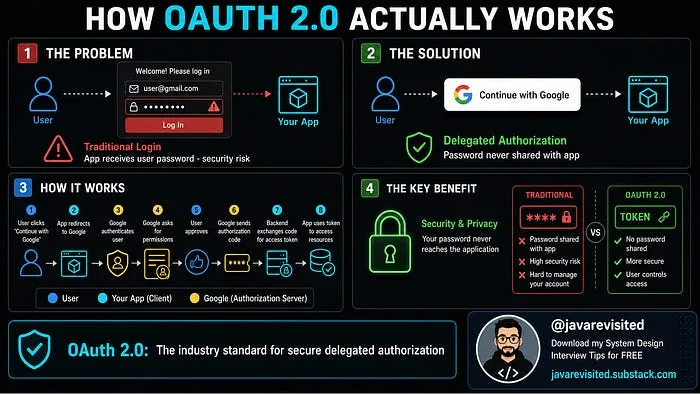
How OAuth 2.0 Actually Works (Explained Simply with Real-World Examples)
javinpaul
2 min readPaywalled