


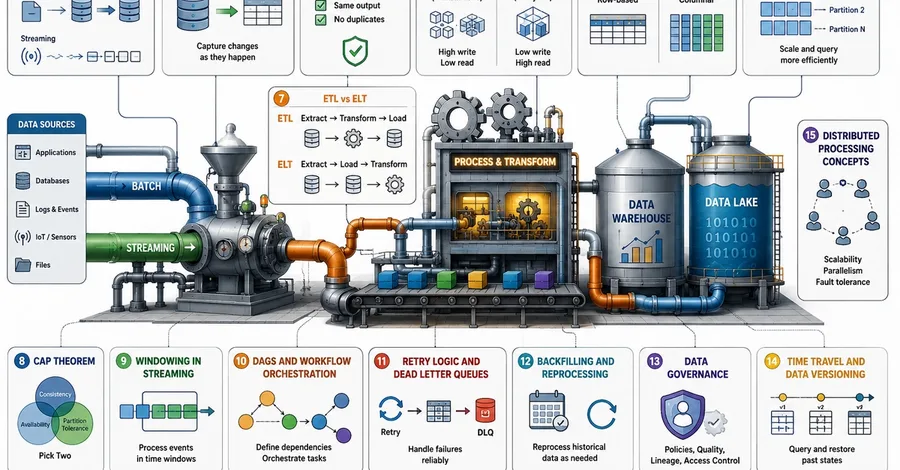
Introduction Data engineering is the practice of designing and building systems for collecting, storing, transforming, and managing data so it can be safely used for reporting, analytics, machine learning, and making business decisions. Think of it as the behind-the-scenes work that makes apps, websites, and businesses function. Every modern company depends on data. If data is like water, data engineers are the plumbers. They build the pipes, water filters, and reservoirs so that clean, safe water comes out of the tap exactly when you need it. This article explains some of the most important foundational concepts in data engineering using practical examples and simple language. 1. Batch vs Streaming Ingestion Ingestion is simply a fancy word for bringing data from an outside source into your own system. There are two main ways to do this. Batch Ingestion - The process of bringing data from an outside source into your system in large, pre-scheduled chunks. It is like filling up a bucket at a well. You wait until a specific time, gather a large chunk of data, and move it all at once. Think of it as a slow but steady cargo ship. Characteristics Processes high volumes of data at once Runs on scheduled intervals (e.g., hourly or daily) Higher latency (delay) Highly cost-effective. Tools: AWS Glue, Apache Airflow, Airbyte. Examples: Processing all of the daily store sales every night at midnight, or running weekly customer reports every Sunday. Pros: It is much cheaper, easier to manage, and great for moving large historical files. Cons: You do not get information in real-time; you have to wait for the next batch to finish. Streaming Ingestion - The process of bringing data into a system continuously the exact moment it is created. It is like turning on a faucet. Data flows continuously into the system. Think of it as a fast but expensive sports car. Characteristics Operates in real-time or near real-time Handles continuous data feeds Very low latency Requires always-on compute resources. Tools: Apache Kafka, Google Cloud Pub/Sub. Examples: Live GPS tracking for delivery trucks, live stock market updates, or instant credit card fraud detection. Pros: You get immediate insights and can react to problems instantly. Cons: Systems are much more complex to build and cost a lot more money to keep running 24 hours a day, 7 days a week. 2. Change Data Capture (CDC) A technique used to identify, capture, and deliver only the data changes (inserts, updates, deletes) in a database to a downstream system in real-time. Imagine you have a giant printed phone book with one million numbers, and ten people change their phone numbers today. If you want to share the updated phone book with a friend, printing a whole new book is a massive waste of paper and time. Instead, you just hand your friend a small sticky note saying, Update these 10 numbers. Change Data Capture (CDC) is that sticky note. How it works: Instead of copying an entire database table over and over again to keep a secondary system updated (which would slow down the computers), CDC tools constantly monitor the original database. They capture only the new records, the updated records, or the deleted records. If a database has 1 million rows, and only 20 change today, CDC only moves those 20 changes. This saves storage space, lowers computing costs, and keeps data pipelines moving very quickly. Engineers usually use log-based CDC, which silently reads the database's hidden background activity log so it doesn't slow down the main system that customers are using. Characteristics Highly efficient Minimizes network traffic Reduces computing load on source systems Reads transaction logs rather than querying tables directly. Tools: Debezium, AWS Database Migration Service (DMS), Oracle GoldenGate. Pros: Highly efficient (saves bandwidth/compute), provides near real-time updates, captures exact deleted records, and has a very low impact on the source database's performance. Cons: Highly complex to configure, fragile to sudden database schema changes, and executing the "initial load" snapshot before streaming begins can be difficult. 3. Idempotency A property of operations in computer science where performing a task multiple times yields the exact same result as performing it just once. It guarantees safety in a world where computers glitch all the time. Think of an elevator button. If you press the button for the 5th floor once, you go to the 5th floor. If you get impatient and press it ten times, you still just go to the 5th floor. Nothing extra happens. Characteristics Highly fault-tolerant Relies on unique ID tags or primary keys Prevents data corruption Ensures absolute safety during automatic system retries. Example: In data pipelines, tasks often fail and automatically try again. Imagine a customer buys a shirt, but the internet connection glitches and the payment system automatically retries the transaction. Without idempotency, the customer accidentally gets charged twice. With idempotency, the system recognizes the duplicate request and ignores it. Engineers achieve this by giving every piece of data a unique ID tag or using special rules so data is never corrupted or duplicated by automatic retries. Pros: Guarantees data accuracy, prevents duplicate records, and makes pipelines highly fault-tolerant. Cons: Requires extra engineering effort to design, necessitates state tracking or unique IDs, and can introduce a slight performance overhead. 4. OLTP vs OLAP These are two different types of databases built for very different jobs. OLTP (Online Transaction Processing) - Systems designed to handle day-to-day business operations by instantly executing fast, small database actions. How it works: Focus on the word Transaction. Think of using an ATM or buying something at an e-commerce checkout. These systems need to look up a price, add a single order, or update a bank balance instantly. They are built for incredibly fast, very small actions. Characteristics Uses highly normalized data Features incredibly fast write speeds Supports high volumes of simultaneous users Uses row-based storage. Tools: OLTP databases include MySQL, PostgreSQL, and SQL Server. Pros: Incredibly fast for single-record inserts/updates and supports thousands of live users simultaneously. Cons: Terrible for analyzing massive historical datasets or running complex aggregations. OLAP (Online Analytical Processing) - Systems built for complex reporting, data mining, and researching massive datasets. How it works: Focus on the word Analytical. Think of a manager looking at sales trends over the last five years. They do not care about one specific receipt but want to add up millions of receipts to see the big picture. OLAP databases handle massive, complex math queries and historical analysis. Characteristics Uses denormalized data Incredibly fast read speeds Handles heavy mathematical aggregations Uses columnar storage. Tools: Popular examples (often called data warehouses ) include Snowflake, Google BigQuery, and Amazon Redshift. Pros: Excellent for complex math, reporting, and scanning millions of rows instantly. Cons: Very slow for single-row updates and not built to handle live application transactions. 5. Columnar vs Row-based Storage The physical method by which data is saved onto a computer's hard drive, organized either by rows or by columns. Row-based Storage How it works: Saves data row by row, exactly like reading a book from left to right. If you have a table with ID, Name, and Salary, it saves 1, John, 5000, together in one sentence. This is perfect for the fast OLTP systems. If John logs into an app, the system can grab his entire profile in one quick read. Characteristics Optimizes write operations Retrieves entire single records instantly Ideal for OLTP transaction systems. Tools/Formats: CSV and standard relational database tables. Pros: Perfect for retrieving entire individual records quickly, highly optimized for fast write operations. Cons: Slow and expensive for analytical queries that only need to read one or two specific columns across millions of rows. Columnar Storage How it works: Saves data column by column. All the IDs are stored together in one block, all the Names together in another block, and all the Salaries together in a final block. This is perfect for OLAP analytics. If you ask the database, What is the average salary of all employees?, the system only scans the specific file block containing salaries. It ignores the names and IDs entirely, making the math incredibly fast. Characteristics Optimizes read operations Retrieves specific fields quickly while ignoring others Highly compressible Ideal for OLAP analytics. Tools/Formats: Parquet, ORC, and Apache Arrow. Pros: Extremely fast for analytical reads and highly compressible (saving storage space). Cons: Very slow for writing single new rows or updating specific records. 6. Partitioning The process of dividing a massive messy dataset into smaller, perfectly organized folders based on a specific rule (like organizing by Date, Region, or Product Category). Imagine a huge filing cabinet with ten years of paper invoices stuffed randomly into one drawer. To find an invoice from January 2024, you have to look through every single piece of paper. If you partitioned the cabinet by year, and then divided it again by month, you could immediately open the 2024 drawer, grab the January folder, and find your paper. How it works: By organizing data into partitions, a computer's search query only looks inside the relevant folders. This stops the computer from searching like a needle in a haystack, which speeds up the search and drastically reduces the cost of running the system. Characteristics Drastically reduces query scan time Improves overall system performance Lowers cloud computing costs Organizes data into physical directory paths. Tools: Apache Spark, Hive, AWS Athena. Pros: Drastically speeds up search queries and significantly lowers cloud computing costs. Cons: Over-partitioning can create the small file problem (too many tiny files that slow down the system), and uneven data distribution can cause performance-killing data skew. 7. ETL vs ELT These are the three steps taken to move and prepare data; Extract (pulling it from the source), Transform (cleaning, filtering, and shaping it), and Load (saving it in its final destination). ETL (Extract, Transform, Load) Cleans data before loading it to the final destination, protects the data warehouse from bad data, relies on a separate processing engine, and represents the traditional method. How it works: You pull data from the source, clean it on a temporary processing server, and then load the cleaned data into the final warehouse. Think of this like washing your muddy vegetables outside in the yard before bringing them into your house. It keeps bad data out of your warehouse, but the temporary server can be slow and rigid. Tools: Informatica, Talend, IBM DataStage. Pros: Keeps bad/dirty data out of your final warehouse, eases the compute burden on the target database. Cons: The temporary transformation server can be a slow, rigid bottleneck. ELT (Extract, Load, Transform) Cleans data after it reaches the destination, utilizes the massive scalable compute power of modern cloud warehouses, is highly flexible, and stores raw data natively. How it works: You pull the raw, messy data and dump it straight into the final warehouse exactly as it is. Then, you use the massive power of the modern cloud warehouse to clean and shape the data inside it. Think of this like bringing all your muddy vegetables straight into a giant, modern kitchen and washing them there because you have a super-fast, industrial sink. This is the modern approach. It is much faster and more flexible, though you have to pay to store all that raw, uncleaned data. Tools: dbt (data build tool), Fivetran, Matillion. Pros: Much faster ingestion, highly flexible, leverages the massive scale of modern cloud warehouses. Cons: Increases storage costs (by saving all raw data) and can clutter the warehouse with messy data if not governed properly. 8. CAP Theorem A fundamental principle of system design stating that a distributed data store can only simultaneously guarantee two out of three features at the exact same time - Consistency, Availability, and Partition Tolerance . How it works: The CAP theorem is a strict rule for distributed systems (a network of multiple computers working together). • Consistency (C) - Every user sees the exact same data at the exact same time, no matter which computer they connect to. • Availability (A) - The system is always turned on and responds to every single request without failing. • Partition Tolerance (P) - The system keeps working even if the internet or network connection between the computers suddenly breaks. Examples: Because network breaks will always happen eventually in the real world, systems must have Partition Tolerance. Therefore, engineers must make a difficult choice during a failure; do you want Consistency or Availability? • A banking system will choose Consistency. It will refuse to show your account balance (losing Availability) if it cannot guarantee the number is 100% accurate. • A social media feed will choose Availability. It will keep loading posts for you to scroll through, even if it accidentally misses a comment your friend just left (losing Consistency). Characteristics Represents necessary trade-offs in architecture Forces engineers to prioritize either accuracy or uptime during failures Dictates database behavior. Tools (Databases typed by CAP): MongoDB and HBase prioritize CP (Consistency/Partition Tolerance). Cassandra and CouchDB prioritize AP (Availability/Partition Tolerance). Pros: Provides a clear architectural framework for understanding distributed system limitations and guides safe database selection. Cons: It forces difficult trade-offs; you cannot have a perfect system, meaning businesses must sacrifice either absolute accuracy or constant uptime during network failures. 9. Windowing in Streaming The technique of dividing a continuous, never-ending stream of data into finite, manageable time blocks to perform math and calculations. How it works: When you process data in batches, you know exactly when the data starts and ends. But streaming data is continuous, it never stops. To do math on a continuous stream, engineers have to chop time into smaller, manageable chunks called windows . Examples: • Tumbling Window - Fixed blocks of time that do not overlap. For example, counting website clicks from 1:00 to 1:05, and then starting a totally new count from 1:05 to 1:10. • Sliding Window - Overlapping blocks of time. You might ask for a total count of clicks in the last 10 minutes, but you want that total number updated on your screen every 1 minute. • Session Window - Based on a specific user's activity. The window opens when the user logs in and stays open as long as the user is clicking around. The window only closes after they put their phone down and are inactive for 30 minutes. Characteristics Time-bound Relies on event-time or processing-time Handles unbounded data effortlessly Maintains a system state across intervals. Tools: Apache Flink, Apache Beam, Spark Streaming. Pros: Makes calculating infinite continuous data possible and allows for stateful real-time aggregations (like running totals). Cons: Complex to configure (especially handling late-arriving data) and requires high memory usage to maintain the active window states. 10. DAGs and Workflow Orchestration A DAG is a visual map of dependent tasks, and Workflow Orchestration is the automated system that coordinates and triggers those tasks. How it works: DAG (Directed Acyclic Graph) - a one-way flowchart where tasks point in one direction, and they never loop backward. In a data pipeline, a DAG maps out the exact order of steps. Example: Step 1: Extract Data -> Step 2: Clean Data -> Step 3: Generate Report. The cleaning step cannot start until the extraction step finishes. Workflow Orchestration - These tools are the traffic cops that manage these DAG flowcharts. They wake up on a strict schedule, trigger the steps in the exact right order, monitor the system for failures, and manage automatic retries if something breaks. Characteristics Executes tasks sequentially or in parallel Visually tracks dependencies Never loops backwards Automates scheduling, monitoring, and error handling. Tools: Apache Airflow, Prefect, Dagster, Mage. Pros: Provides clear visual monitoring, automates error retries, and completely removes the need for manual scheduling. Cons: Introduces a steep learning curve, and the orchestration tools themselves require dedicated servers and maintenance. 11. Retry Logic and Dead Letter Queues Built-in error handling mechanisms. Retry logic defines how a system automatically re-attempts failed operations, while a Dead Letter Queue (DLQ) isolates persistently failing data for manual review. How it works: Computer systems fail all the time. Passwords expire, internet networks drop, and software programs crash. Good data systems plan for these failures in advance. • Retry Logic - tells the system what to do when it hits an error. If you keep asking a broken system for data every single second, you might break it worse. Instead, engineers use an exponential backoff strategy; if it fails, wait 5 seconds and try again. If it fails again, wait 15 seconds. If it fails again, wait 60 seconds. This gives the broken system time to recover. • Dead Letter Queues (DLQ) - If a piece of data fails repeatedly and simply will not work, you do not want it to block the rest of the pipeline like a broken car on a highway. Instead, the system moves the failing data to a Dead Letter Queue. This is a special needs fixing folder just for bad messages. The main pipeline keeps running smoothly, and an engineer can manually look at the DLQ folder later to see what went wrong. Characteristics Employs exponential backoff strategies Prevents bad data from bottlenecking pipelines Isolates errors cleanly Ensures overall fault tolerance. Tools: AWS SQS (DLQ feature), RabbitMQ, Apache Kafka, and orchestration tools like Airflow (for retries). Pros: Prevents transient glitches from crashing pipelines and isolates bad data without stopping the whole system. Cons: DLQs require manual human review to fix the errors, and poorly configured retries can overload a broken system. 12. Backfilling and Reprocessing The procedures used to load missing historical data into a system or overwrite existing historical data with corrected calculations. How it works: Pipelines usually run today's data. But sometimes you need to process data from the past. • Backfilling - filling in missing history. It is like filling in a blank page in a diary. If a pipeline breaks and is offline for two days, you have an empty gap in your database. Once you fix the system, you must backfill those missing two days to make your records complete again. • Reprocessing - fixing mistakes. It is like using an eraser to fix a misspelled word in your diary. If your code had a hidden bug and calculated last month's numbers incorrectly, you have to update the code, delete the bad data, and run last month's raw data through the pipeline all over again to get the right answers. Characteristics Computationally heavy Manages historical time-ranges Fixes bugs or system outages Requires strict idempotent pipelines to run safely. Tools: Apache Airflow, dbt, Apache Spark. Pros: Fixes broken data, restores missing historical records, and ensures analytics are 100% accurate. Cons: Very expensive in cloud compute costs, time-consuming, and can accidentally duplicate data if pipelines aren't perfectly idempotent. 13. Data Governance A formal framework of rules, policies, and processes that dictates how a company keeps its data secure, accurate, and organized. How it work
Building the Pipes: Core Data Engineering Concepts Explained
Lawrence Murithi