


Build a Real-Time Polymarket Order Book Monitor A trading bot should not make decisions from stale snapshots. If you want to understand liquidity, spread, depth, or changes in market structure, you need a continuously updated view of the Polymarket order book. This tutorial builds a lightweight Polymarket order book Python monitor using the public CLOB Market WebSocket. Polymarket documents this channel as a real-time feed for order-book, price, and market lifecycle updates. The implementation intentionally focuses on market data—not order execution—so it can be used as the foundation for research, dashboards, alerts, or an automated trading system. What You'll Learn How Polymarket token IDs relate to order-book subscriptions How to connect to the CLOB Market WebSocket How to process book and price_change events How to calculate best bid, best ask, and spread How to handle reconnects and heartbeats How to detect stale market data How to turn raw WebSocket events into trading signals Architecture flowchart LR A[Polymarket CLOB] --> B[Market WebSocket] B --> C[Python Async Client] C --> D[Order Book State] D --> E[Spread / Depth Metrics] D --> F[Trading Signal Engine] D --> G[Logging / Monitoring] The important design decision is separating transport from state . The WebSocket delivers events; your application maintains the current book. 1. Install the Dependencies For this monitor, authentication is not required because the Market WebSocket is public. pip install websockets You need a Polymarket asset ID/token ID for the outcome you want to monitor. The Market Channel subscribes using assets_ids . For example: TOKEN_ID = " YOUR_TOKEN_ID " Do not hard-code credentials into a market-data monitor. In this example, there are no credentials at all. 2. Connect to the Market WebSocket The documented Market Channel endpoint is: wss://ws-subscriptions-clob.polymarket.com/ws/market The subscription message contains type: "market" and one or more asset IDs. A minimal monitor looks like this: import asyncio import json import logging import websockets WS_URL = " wss://ws-subscriptions-clob.polymarket.com/ws/market " TOKEN_ID = " YOUR_TOKEN_ID " logging . basicConfig ( level = logging . INFO , format = " %(asctime)s %(levelname)s %(message)s " ) async def monitor (): async with websockets . connect ( WS_URL , ping_interval = None ) as ws : await ws . send ( json . dumps ({ " type " : " market " , " assets_ids " : [ TOKEN_ID ] })) logging . info ( " Subscribed to %s " , TOKEN_ID ) async for raw_message in ws : if raw_message == " PONG " : continue message = json . loads ( raw_message ) await handle_message ( message ) async def handle_message ( message ): event_type = message . get ( " event_type " ) if event_type == " book " : print_book ( message ) elif event_type == " price_change " : logging . info ( " Price update: %s " , message . get ( " price_changes " , []) ) elif event_type == " last_trade_price " : logging . info ( " Trade: %s @ %s " , message . get ( " size " ), message . get ( " price " ) ) def print_book ( book ): bids = book . get ( " bids " , []) asks = book . get ( " asks " , []) if not bids or not asks : return best_bid = max ( float ( x [ " price " ]) for x in bids ) best_ask = min ( float ( x [ " price " ]) for x in asks ) spread = best_ask - best_bid print ( f " Bid= { best_bid : . 4 f } " f " Ask= { best_ask : . 4 f } " f " Spread= { spread : . 4 f } " ) asyncio . run ( monitor ()) The initial book event contains aggregated bid and ask levels. Polymarket also documents price_change as an order-book price-level delta event. 3. Don't Ignore the Heartbeat A production client should implement the documented application-level heartbeat. Polymarket's current documentation specifies that clients send PING every 10 seconds and receive PONG . Add a dedicated heartbeat task: async def heartbeat ( ws ): while True : await asyncio . sleep ( 10 ) await ws . send ( " PING " ) Then start it after connecting: heartbeat_task = asyncio . create_task ( heartbeat ( ws )) try : async for raw_message in ws : ... finally : heartbeat_task . cancel () This is preferable to relying blindly on the WebSocket library's protocol-level ping mechanism because the Polymarket feed specifies its own application-level heartbeat. 4. Maintain Book State For research, repeatedly printing snapshots is not enough. Store price levels in dictionaries: book = { " bids " : {}, " asks " : {} } For every snapshot: for level in message [ " bids " ]: book [ " bids " ][ level [ " price " ]] = float ( level [ " size " ]) for level in message [ " asks " ]: book [ " asks " ][ level [ " price " ]] = float ( level [ " size " ]) A real implementation should also process every documented price-level change according to its side , price , and size fields. The key principle is simple: The WebSocket is the event stream. Your local order book is the state machine. 5. Useful Real-Time Metrics Once the book is normalized, you can calculate: Best bid best_bid = max ( book [ " bids " ]) Best ask best_ask = min ( book [ " asks " ]) Spread spread = best_ask - best_bid Midpoint mid = ( best_bid + best_ask ) / 2 Top-of-book imbalance A simple research metric is: imbalance = ( bid_size - ask_size ) / ( bid_size + ask_size ) These metrics do not constitute a profitable strategy by themselves. They are observations that can become inputs to a broader execution or pricing model. Production Considerations A production monitor should add: Automatic reconnection Exponential backoff Subscription restoration Heartbeat monitoring Message validation Sequence/state consistency checks Stale-data detection Structured logging Persistent event storage Graceful shutdown Do not assume that an open TCP/WebSocket connection means your market data is healthy. Polymarket's status history has documented WebSocket incidents and CLOB maintenance events, so operational monitoring matters even when your application code is correct. Failure Modes Connection succeeds but no data arrives Check the asset ID, subscription payload, market state, and application heartbeat. Your book becomes inconsistent Do not treat every message as an independent snapshot. Distinguish full book events from incremental price_change events. Your monitor silently becomes stale Track the timestamp of the most recent valid market event and raise an alert when it exceeds your application's freshness threshold. The code breaks after a Polymarket API change Pin and regularly review dependencies, then check the official documentation and changelog before upgrading production infrastructure. Polymarket's changelog records significant CLOB/API changes, including the 2026 CLOB V2 production migration. Performance Considerations Do not perform expensive calculations inside the WebSocket receive loop. A better architecture is: WebSocket ↓ Parser ↓ Book State ↓ Event Queue ↓ Analytics Workers ↓ Strategy The receive loop should process messages quickly and hand heavier work to another component. For high-frequency research, avoid unnecessary JSON transformations, excessive logging, database writes on every event, and repeated full-book sorting. Security A public order-book monitor does not need private keys or trading credentials. Keep the market-data process separate from execution credentials whenever possible. If you later connect the monitor to order placement, store secrets in environment variables or a proper secret-management system. Never put private keys, API secrets, or seed phrases inside source code. Testing Strategy Use recorded WebSocket messages to build deterministic tests. Test at least: Empty books One-sided books Multiple price levels Price-level removal Price changes Malformed JSON Unknown event types Reconnection Heartbeat failure Stale timestamps Tick-size changes A particularly useful test is replaying a historical event sequence and verifying that your reconstructed book matches the expected final state. Monitoring and Observability Expose metrics such as: websocket_connected last_message_timestamp messages_received book_events price_change_events reconnect_count parse_errors book_age_seconds For trading infrastructure, data freshness is itself a metric . A strategy using a technically correct but stale order book can make decisions based on a market that no longer exists. Advanced Improvements Once the basic monitor works, extend it into a research-grade market-data engine: Subscribe to multiple tokens Maintain separate books per asset Store normalized events in Parquet Calculate depth at multiple price levels Track spread changes Detect liquidity withdrawals Build order-book imbalance features Compare Polymarket prices with external models Feed normalized data into a signal engine Replay recorded books for backtesting This creates a clean separation between market-data collection , feature generation , strategy logic , and execution . Frequently Asked Questions Is the Polymarket order book available through WebSocket? Yes. The public Market Channel provides real-time order-book and market updates. Do I need API credentials to monitor an order book? No. The Market Channel is public. The authenticated User Channel is separate and is used for user-specific order and trade updates. What is an asset ID? It identifies a specific outcome token used by the CLOB Market WebSocket subscription. Should I poll the order book instead? Polling can be useful for snapshots and recovery, but a streaming architecture is more appropriate when you need continuous market-data updates. Does an order-book monitor guarantee trading profits? No. Market-data quality is only one component of a trading system. Slippage, fees, liquidity, latency, adverse selection, execution risk, and model error can all affect results. Conclusion Building a Polymarket order book Python monitor is less about printing bids and asks and more about building a reliable market-data pipeline. Start with the public CLOB Market WebSocket, maintain local book state, process snapshots and price changes correctly, implement heartbeats and reconnection, and measure data freshness. Once that foundation is reliable, you can build analytics and trading logic on top of it without coupling strategy code to the raw WebSocket transport. Educational disclaimer: This article is for software-development and market-data research purposes. Order-book signals do not guarantee profitable trading, and automated trading involves financial and technical risks. Related Articles How to Build a Polymarket Trading Bot in Python Anchor: Polymarket trading bot in Python Connects market-data infrastructure to the complete bot architecture. Polymarket API Explained for Developers Anchor: Polymarket API Provides broader API architecture and endpoint context. How Polymarket CLOB Works Anchor: Polymarket CLOB Explains the central-limit order-book model behind the monitor. Polymarket WebSocket API Guide Anchor: Polymarket WebSocket API Natural follow-up for streaming architecture. How to Calculate Polymarket Market Probability Anchor: Polymarket probability calculation Connects prices and order-book observations to quantitative analysis. Building a Polymarket Market-Making Bot Anchor: Polymarket market-making bot Extends the data layer toward automated quoting. Useful Resources Polymarket — Official prediction-market platform. Polymarket Documentation — Primary technical reference. Market Channel documentation — Current CLOB Market WebSocket message and subscription reference. Polymarket Changelog — Useful for tracking API and CLOB changes. Polymarket Status — Operational status and incident history. I have intentionally omitted Medium, DEV.to, and YouTube resources because I could not verify a specific current resource that is sufficiently relevant to this exact implementation without fabricating a URL. About the Author Bo$onaX I write about Polymarket trading bots, prediction-market infrastructure, algorithmic trading, Python automation, Web3 development, and quantitative strategies. Contact: X: https://x.com/xxniiinxx Telegram: https://t.me/bosonax
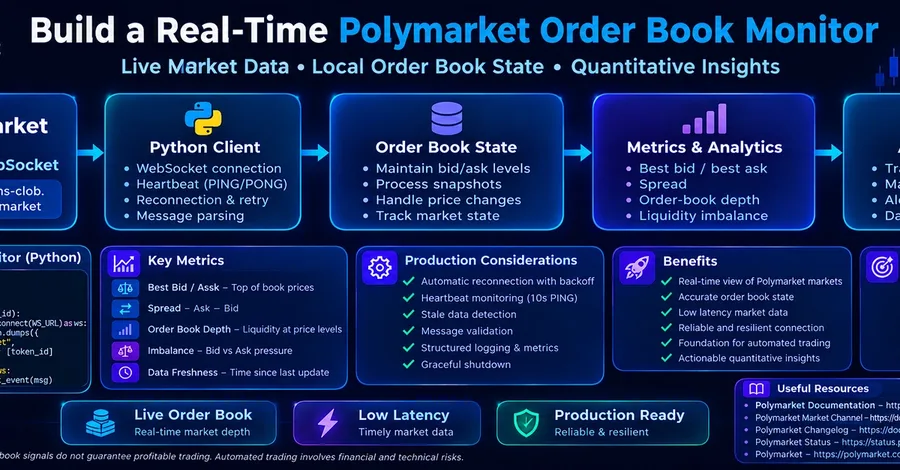
Build a Real-Time Polymarket Order Book Monitor with Python
Bo$onaX