


Ever since I got involved with local LLMs I wanted to share the magic with my friends. The process before involved either Ollama or llama.cpp, which are great, but the setup was difficult and a barrier to entry for most people. WHAT ARE THE BENEFITS OF LOCAL AI? Local AI isn't as powerful as cloud-based solutions, but the gap is narrowing. With local AI there are no subscription costs, token limits, or outages, since it all runs on your own hardware. It doesn't require an internet connection, so it can be used fully offline. For businesses that are worried about leaking IP or sensitive data it's especially attractive. It stays on your machine and your data doesn't get captured by some company that may or may not use it to train their next model. WHAT YOU NEED FIRST Before we get started you need to understand what your hardware is capable of. For this to work well I suggest an Apple Silicon Mac with at least 24 GB of unified memory, or a gaming desktop with at least 16 GB of VRAM. The more VRAM you have, the more capable models you will be able to run. For reference, I run it on three machines: a MacBook Pro with 96 GB of unified memory, a Mac Mini with 24 GB, and a gaming desktop with a Radeon 7900 XTX. ONE INSTALLER, NO SETUP Unsloth Desktop is what people have been waiting for. It's just been released as a beta. It's pretty much a single-click install. You download the installer and run it, and from there Unsloth Desktop handles everything else for you. Behind the scenes it scans your machine and determines what needs to be installed. It puts a wrapper around llama.cpp and MLX, which gives you all the power of the top open source models without having to manage the underlying tools. Unsloth Desktop will automatically detect if any of the tools have gotten any updates and will prompt you to install the updates. MODELS COME STRAIGHT FROM HUGGING FACE Not only does Unsloth Desktop make the initial install easy, it integrates directly with Hugging Face. For those who are new to all of this, Hugging Face is the open weight repository for AI models that Nvidia is acquiring for $13 billion . Accessing the repository is as simple as clicking a drop-down menu. It shows you recommended models and what you already have downloaded on your device. The other great thing is that Unsloth tells you what will fit on your machine. Local AI is very VRAM intensive. Models come in different compressed sizes called quantized models, and the goal is to run the least compressed version that fits on your machine while still leaving enough space for a reasonable context window. That used to be tricky to calculate. In the model list, anything that won't fit displays as TIGHT or OOM, which takes a lot of the guesswork out of it. Once the model is downloaded, Unsloth Desktop configures it with reasonable defaults and sets the context window as large as it can with the memory left over. The right model is not the biggest one. It is the largest one that still leaves room for context. WHICH MODEL SHOULD YOU START WITH For first time users you may be asking yourself, what model do I use? As a starting point I recommend Qwen 3.8 27B. It's a new model that really performs well in all of the benchmarks, and it is great at coding tasks and for agent use. If you are looking for a good general knowledge model I recommend Gemma 4 26B A4B, which is made by Google. Whichever you pick, the quant matters as much as the model. I run UD-Q4_K_XL of Qwen 3.8 27B on my 24 GB card, which leaves me a 47k context window. On a 16 GB graphics card you would have to go down to a Q3 to get the same model to fit. Open the list, look at what is marked TIGHT or OOM, and take the largest one that still leaves you room. On my MacBook Pro with 96 GB of unified memory I run UD-Q8_K_XL with a 223k context window. WHAT IT DOES TODAY After getting a model, you are ready to use the LLM. Unsloth Desktop provides a similar interface to other products like Claude Desktop or ChatGPT. Unsloth Desktop is less than a month old and here are some cool things it does right now: Automatically installs and updates the components needed to run local AI. Gives you access to the Hugging Face repositories, and tells you what actually fits on your machine. Gives you access to Deep Research and Web Search, which are higher quality than the solutions I was able to configure manually using llama.cpp. (SearXNG I am looking at you) Accepts attachments and reads images, as long as the loaded model has that capability. Hosts the model for other harnesses of your choice, such as Claude Code, Codex, OpenClaw, OpenCode and Pi. Connects to MCP servers. Supports Projects and Code mode. Lets you dictate to the chat using your voice. The list above is just talking about LLMs. Unsloth Desktop also supports image generation, video generation, audio, training of models, and more. Just to give you an example of what this is capable of, one of my machines is running an AMD Radeon 7900 XTX with 24 GB of VRAM and 32 GB of system RAM. I asked Qwen 3.8 27B to create a clone of Flappy Bird, and here is what it produced in one shot: play it in your browser . WHERE IT FALLS SHORT Local models and Unsloth Desktop aren't perfect. Here are a few things I found annoying or undesirable: At the time of writing it doesn't let you customize which folder it uses for code projects. It defaults to its own, and I hope that is something they add soon. It took me longer than it should have to find where it was saving my files. If you have low-spec hardware your results won't be nearly as impressive. It means using a highly compressed model, or a smaller one that is inherently less powerful. Any time you are in the Q2 range, models don't really work like they are supposed to. They can be quite dumb and you should really aim to run a Q4 or higher. Depending on your hardware the context window is usually smaller than cloud products like Claude or ChatGPT, which may mean breaking your projects into smaller chunks instead of doing big tasks all at once. The real breakthroughs and innovations are happening on the cloud side of things. If you want to always use the most powerful models, you should be using them. The new Qwen 3.8 27B feels more like something that was available on Claude 6 months ago. Models are only part of the equation. Having a good harness is the other half of the puzzle. I have tried a few and I currently recommend Pi . Look for a future post about how important choosing the right harness is. Unsloth Desktop was just released on August 11, 2026 and it already has an impressive list of features. I am excited to see where they go from here. This post and my other work can be found on my personal website https://www.brianintheloop.com/
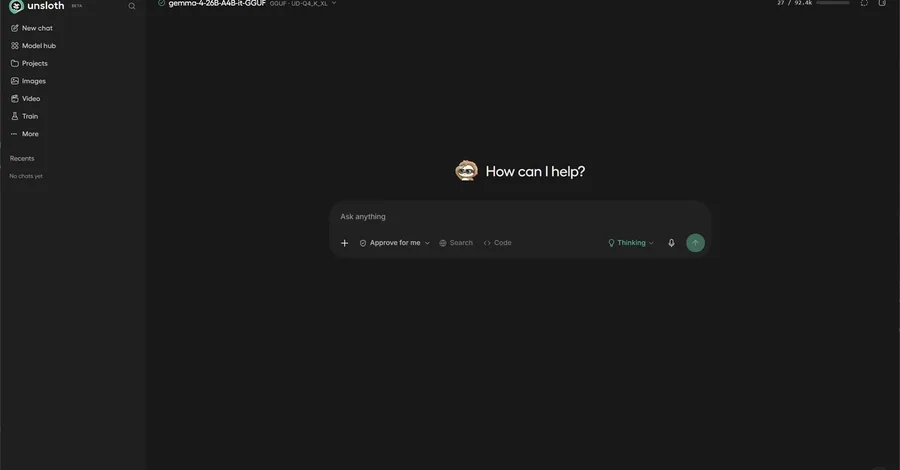
Unsloth Desktop brings Local AI to the masses
BrianInTheLoop