


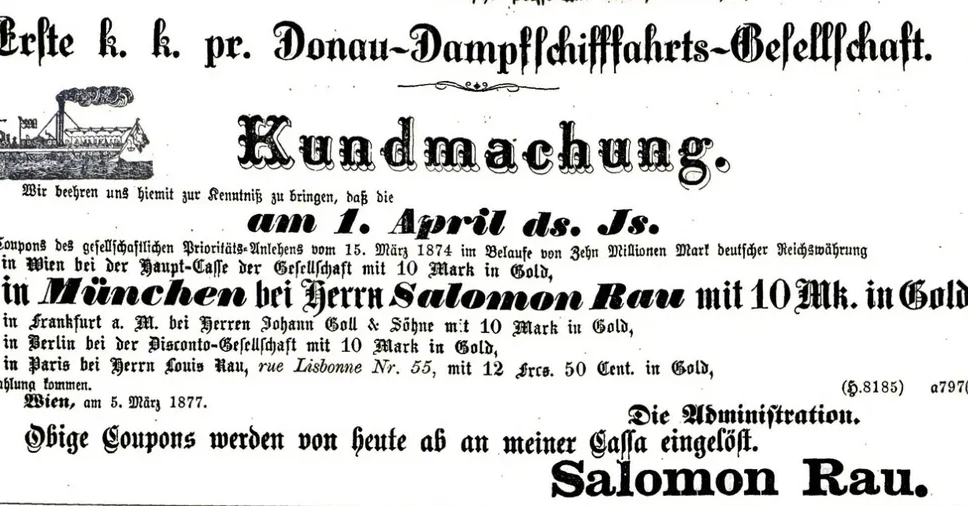
For years now, I’ve been writing a book tracing four family branches across Europe, the Middle East, and South Africa. One thread follows Louis Rau, my 3rd great-uncle, who was president of Compagnie Continentale Edison (CCE) in the early 1900s. He was an Edison Pioneer, part of the inner circle that brought Edison's electrical systems to Europe. Last year, I found that Thomas Edison's papers were digitized at Rutgers University. So I navigated to edisondigital.rutgers.edu , typed "Louis Rau" into the search box, and hit enter, and 847 results were returned. Somewhere in those 847 documents was the correspondence that would explain Louis Rau's business relationship with Élie Moïse Léon, co-founder of CCE. Somewhere were the letters that traced his movements between Paris and Geneva. Somewhere were the details of CCE's electrical installations across Europe. But I'd have to click through them one by one, read the snippets, open promising documents, cross-reference dates, take notes, come back later and forget which ones I'd already checked… A few weeks ago, I started feeding genealogy documents to Claude AI, but that was still pretty tedious, and I kept hitting image upload limits in conversations. And then it clicked: why not build an MCP server, so Claude could perform the search directly? That question became three MCP servers, a transformed research workflow, and a fundamentally different relationship with historical archives. First Win: The Edison Papers MCP The Edison Papers has an API. I didn't know that initially — I just knew they had a website with a search box. But a quick look at the network tab showed clean REST endpoints returning JSON. I opened Claude Code and asked it to build an MCP server that wrapped the Edison Papers API. A few hours of iteration later, I had: edison_search : Query with field-level precision ( creator:"Rau, Louis" , recipient:"Léon, Élie" ) edison_get_document : Retrieve full metadata and transcriptions edison_browse_series : Navigate document collections systematically edison_get_images : Access high-resolution scans raphink / edison-archive-mcp MCP server for the Edison Archive Edison Papers MCP Server An MCP server for querying the Thomas A. Edison Papers (Rutgers University) — ~150,000 documents, public domain (CC0). Tools Tool Description edison_search Full-text search by keyword, author, or recipient edison_get_document Fetch full metadata and transcription for a document by call number edison_browse_series List all documents in an archive series Use with Claude.ai (hosted) Deploy the server online so Claude.ai can connect to it via HTTP. 1. Deploy to Railway (free) Push this repo to GitHub Go to railway.app → New Project → Deploy from GitHub repo Select your repo, then add this environment variable: MCP_TRANSPORT = http ( PORT is set automatically by Railway) Click Deploy (~2 minutes) Go to Settings → Networking → Generate Domain to get your public URL 2. Connect to Claude.ai Go to Claude.ai → Settings → Integrations → Add custom integration and enter: https://your-app.up.railway.app/mcp Use with Claude Desktop (local) 1. Install … View on GitHub Now instead of clicking through 847 results, I could ask Claude: "Find correspondence where Louis Rau is the creator, dated 1892-1895, mentioning electrical installations or Paris operations." And Claude would orchestrate the full research pipeline: Search : Call Edison Papers MCP → retrieve all matching results Triage : Read all abstracts, decide which documents warrant full analysis Track : Create a Notion database entry for each document with analysis status Prioritize : Rank documents by relevance Deep read : For priority documents, get high-resolution images and use OCR for full context Summary: Provide a summary of all findings What would have taken hours of manual clicking, note-taking, and cross-referencing now happens in one conversation. This was immediately useful. But it surfaced a new problem: where do all these findings go? The Organization Problem: Enter Notion MCP I was already using Notion to organize my research: person profiles, document summaries, research questions. And Claude already had an MCP for Notion. So now when I asked: "Search Edison Papers for Louis Rau correspondence from 1892-1895, create a Notion page summarizing the findings, and link it to Louis Rau's profile." Claude would: Search : Call Edison Papers MCP → retrieve all matching results Triage : Read all abstracts, decide which documents warrant full analysis Track : Create a Notion database entry for each document with analysis status Prioritize : Rank documents by relevance Deep read : For priority documents, get high-resolution images and use OCR for full context Document : Update Notion pages with findings Connect : Update profile pages for people mentioned (Louis Rau, Élie Léon, etc.) This was amazing. Structured knowledge, automatically organized, all in one conversation. But then Claude started hallucinating. The Hallucination Problem: Claude Needs Ground Truth Claude would find documents mentioning for example Samuel Léon and Élie Léon, and confidently conclude that they that Samuel was Élie's nephew, completely making it up. Or it would claim someone was born in 1847 when they were actually born in 1867. Dates off by decades. Family relationships invented wholesale. The problem: Claude had access to documents (via Edison Papers MCP) and research notes (via Notion MCP), but not the actual genealogy data. It was inferring family structure from fragmentary mentions in letters and my incomplete notes. I needed to give Claude access to the tree itself, the actual source of truth about who's related to whom and when they lived. Attempt 1: GEDCOM MCP (Local) My family tree lives in Geni — a collaborative genealogy platform to build a unique World family tree. Geni has an API, but OAuth kept failing when I tried it and I wanted something working now . So I took a shortcut. From time to time, I export data from Geni to GEDCOM (the genealogy standard format), with about 25000 individuals in my export. I used airy10's GEDCOM MCP to make it queryable locally. airy10 / GedcomMCP MCP Server to create or query GEDCOM files GEDCOM MCP Server Genealogy for AI Agents, by AI Agents A robust MCP server for creating, editing and querying genealogical data from GEDCOM files Works great with qwen-cli and gemini-cli This project provides a comprehensive set of tools for AI agents to work with family history data enabling complex genealogical research, data analysis, and automated documentation generation. The server has been recently improved with fixes for critical bugs, enhanced error handling, and better code quality while maintaining full backward compatibility. Some sample complex prompts: Load gedcom "myfamily.ged" Make a complete, detailled biography of and his fammily. Use as much as you can from this genealogy, including any notes from him or his relatives You can try to find some info on Internet to complete the document, add some historical or geographic context, etc. Be as complete as possible to tell us a nice … View on GitHub This worked! Now Claude could: Search for individuals by name Verify relationships ("Is X related to Y?") Check birth/death dates Trace lineage paths No more hallucinated family connections. The GEDCOM became a hypothesis database , and claims in documents could be verified against known family structure. Why Geni as my main database? I use Geni instead of maintaining a private tree because genealogy is collaborative research. Multiple people contribute information, sources get peer-reviewed, duplicates get merged. A tree on Geni is a shared knowledge base, not siloed private data that might be duplicated (and wrong) across dozens of individual researchers' files. But the GEDCOM approach had limitations: It only works in Claude Desktop (local MCP) It requires manually re-exporting GEDCOM whenever the tree updated No access in claude.ai web sessions (or phone) I needed the real API. Back to Geni: Tackling OAuth So I went back to the Geni API. A few more hours of iteration with Claude Code, and I had: Full OAuth implementation (access tokens, refresh flow) 13 tools: profile CRUD, relationship pathfinding, merge candidate detection, family traversal Search by name, verify relationships, trace lineage paths programmatically raphink / geni-mcp An MCP Server for Geni geni-mcp An MCP (Model Context Protocol) server that gives Claude access to Geni — the collaborative genealogy platform. Use Claude to browse, search, correct, and extend your family tree. Features Tool Description get_authorization_url Start the OAuth flow — get the URL to authorize Claude exchange_code Complete OAuth — exchange the code for tokens get_my_profile Get your own Geni profile get_profile Look up any profile by ID update_profile Correct names, dates, locations, biography create_profile Add a new person to Geni get_immediate_family Get parents, siblings, spouses, children get_relationship_path Find relationship path between two profiles get_union Get a family unit (couple + children) add_relation Add a parent, child, sibling, or spouse search_profiles Search by name with optional birth/death filters get_merge_candidates Find potential duplicate profiles merge_profiles Merge a duplicate into a base profile Prerequisites A Geni account at geni.com A registered Geni app — create one at geni.com/platform/developer/apps Node.js 20+ Setup 1. Clone & … View on GitHub Now I could ask mid-conversation: "Is Samuel Léon related to Élie Moïse Léon?" and get the relationship path instantly, whether I was in Claude Desktop or claude.ai . The tree became queryable context accessible anywhere, not just on my local machine with an up-to-date GEDCOM file. Third Server: Newspapers MCP With Edison Papers and Geni working, I could trace business connections and verify family relationships. But I was still missing contemporary context: how did the public see these people? What did newspapers say about CCE's operations? Were there announcements, obituaries, social mentions? Historical newspapers are digitized across dozens of national archives. Each has its own interface. Searching them all manually meant opening multiple websites, running the same query in different systems, downloading results individually. So I built a newspapers MCP that: Aggregates multiple national newspaper archives Searches across collections simultaneously Returns snippets as base64-encoded images (because OCR quality varies) raphink / newspapers-mcp Newspapers MCP Server An MCP (Model Context Protocol) server for searching online newspaper archives across multiple countries and regions. This server provides unified access to newspaper collections from around the world through a single, standardized interface. Supported Archives Archive Region Source key Full-text search OCR text Snippet images API key Europeana Collections Europe (multi-country) europeana ✅ ✅ ✅ Optional ( get key ) Gallica (BnF) France gallica ✅ ✅ ✅ None Deutsche Digitale Bibliothek Germany ddb ✅ — ✅ None digiPress (BSB) Germany / Bavaria digipress ✅ ✅ ✅ None ANNO (Austrian NL) Austria / Austro-Hungarian Empire anno ✅ ✅ ✅ None Delpher (KB) Netherlands delpher ✅ ✅ ✅ None Chronicling America (LoC) United States chronicling_america ✅ ✅ ✅ None eLuxemburgensia (BnL) Luxembourg eluxemburgensia ✅ ✅ ✅ None Trove (NLA) Australia trove ✅ ✅ — Required (free — get key ) Norwegian NL (nb.no) Norway norwegian ✅ — — None … View on GitHub Here’s a real example: I asked Claude to search for "Joseph Dreyfus grain Paris 1895" (a grain merchant in the family who had a financial collapse). The MCP found the concordataire liquidation announcement in French commercial journals. That single search led to discovering a 90-page Archives de Paris dossier (D14U³/89) I'm still analyzing. One search. Ten minutes. What would have been days of archive website navigation. How They Work Together: Finding Solomon Rau in Munich Here's a recent example showing how the MCPs orchestrate together: I asked Claude to search for Solomon Rau's activity in Munich newspapers. The newspapers MCP returned various results, including this advertisement: This ad showed Solomon Rau advertising the reimbursement of DDSG (Danube Steam Shipping Company) stock — a discovery that: Revealed his business activity (financial/stock trading) Connected him to DDSG, a major shipping company Provided a concrete date and location (Munich) Led to further discoveries about other family members' activities Claude then cross-referenced this against the Geni tree to verify Solomon's identity and relationships, and documented the finding in Notion with the newspaper snippet as a source. It then correlated it to the DDSG stock that Adolphe Grünberg, Solomon’s son-in-law, had in his post-mortem inventory the next year in 1878, and added another note there. Have you built AI integration for research yourself? What were your best findings?
Building MCP Servers for Genealogy: AI-Powered Historical Research
Raphaël Pinson